

Address
600 California St, San Francisco, CA 9410801 / Product definition
An AI Agent Built Around How Your Organization Works.
Enterprise AI agents connect organizational knowledge, business context, and AI models to help teams find information, reason across sources, and carry work forward.
Instead of relying on one generic chatbot, organizations configure specialized agents around departments, roles, knowledge domains, and workflows.
The intelligence layer between enterprise knowledge and everyday work.
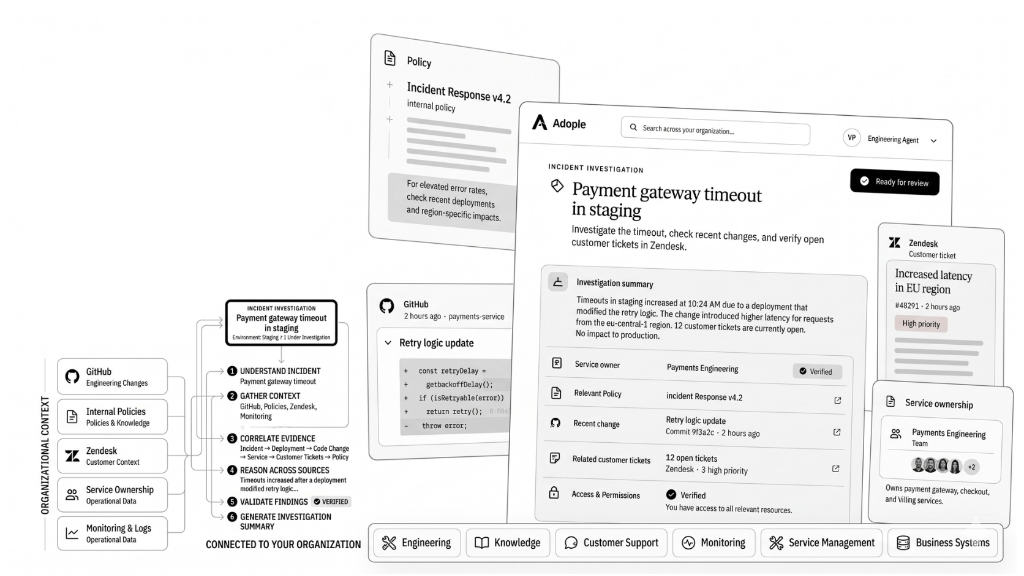
Organizational contextConnects code, policies, tickets, and team runbooks.
Governed investigationReconciles multi-source evidence under strict RBAC.
02 / The knowledge problem
The Information Exists. The Context Is Scattered.
Enterprise teams rarely lack information. The challenge is finding the right information, understanding which sources matter, and turning it into something useful without moving manually between systems.
When knowledge lives across disconnected repositories, teams waste hours reconciling conflicting versions, asking colleagues for access, and manually piecing together evidence.
Scattered enterprise silosData trapped across drive, Slack, Git, and support tickets.
Manual triage bottlenecksHours lost waiting on colleagues and hunting down runbooks.
Information Is Available, But Work Stays Fragmented.
- Search across disconnected tools.
- Reconcile versions and ask colleagues for missing context.
- Manually prepare the response and hand it off.
Approved Context Moves With The Request.
- Retrieve from connected sources in parallel.
- Apply permissions, terminology, and workflow rules.
- Return a grounded result with the next step ready.
04 / Enterprise connectors
Adople Connects To The Apps Your Teams Already Use.
Plug-and-play connections sync updates in real time and respect fine-grained access controls.
See All Connectors ↗







05 / Agent execution
A Request Becomes A Context-Aware Workflow.
An enterprise agent determines what information is relevant, applies the context required for the task, and moves through the steps needed to produce a useful outcome.
06 / Operational change
Move From Scattered Information To Completed Work.
Enterprise AI agents connect the source, context, and approval step so teams spend less time searching and more time finishing.
| Stage | Conventional workflow | With enterprise AI agents |
|---|---|---|
| Find information | Search multiple disconnected systems manually | Agent retrieves relevant sources automatically in parallel |
| Understand context | Interpret each document and identify conflicts | Agent assembles context, hierarchy, and guidelines |
| Resolve gaps | Wait on colleagues or specialists | Agent uses connected organizational knowledge |
| Prepare response | Manually synthesize findings into a document or email | Agent produces structured, grounded output |
| Next step | Copy-paste and email handoffs | Workflow continues directly into the next action |
| Knowledge reuse | Trapped in individual expertise and memory | Governed, reusable context under RBAC |
07 / Specialized personas
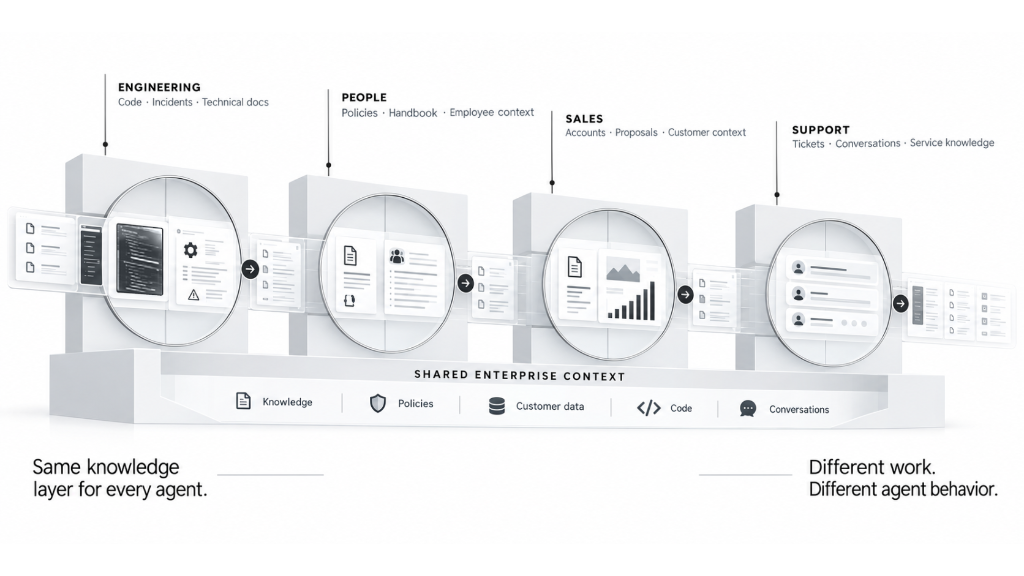
One Platform. Different Agents For Different Work.
Configure specialized agents around departments, roles, and business functions so behavior reflects the work it is expected to perform.
Agent / EngineeringCode · Incidents · Technical docs
Engineering
Connect technical documentation, GitHub repositories, jira projects, and internal knowledge to investigate issues and retrieve technical context faster.
Agent / PeoplePolicies · Handbook · Employee context
Human Resources
Navigate policies, procedures, benefits documentation, and internal resources while maintaining appropriate access boundaries.
Agent / SalesAccounts · Proposals · Customer context
Sales
Retrieve proposal history, product information, customer context, and internal knowledge before every conversation.
Agent / SupportTickets · Conversations · Service knowledge
Support & Operations
Ground support and operations work in product documentation, internal procedures, and service knowledge.
08 / Security & control
Enterprise Governance And Security Controls.
Designed for organizations that require strict access boundaries, complete auditability, and privacy for company data.
Role-aware access control
Inherits user permissions from connected systems.
Human-in-the-loop safeguards
Consequential actions require explicit employee sign-off.
Zero data training
Enterprise documents and prompts are not used to train external models.
Comprehensive audit trails
Queries, reasoning steps, and document citations are logged.
70%+Reduction in time spent searching for policy exceptions3 fewerhandoffs per compliance inquiry100%auditability on citations and source references
09 / Questions & answers
Frequently Asked Questions.
Everything you need to know about enterprise AI agents, security models, connector authorization, and implementation.
Have A Custom Integration Or Security Query?
Our solutions architects can review your architecture and data isolation requirements.
Talk To An ArchitectNext steps
Start With The Work Your Teams Repeat Every Day.
Identify the knowledge-heavy workflows where people spend time searching, interpreting, and coordinating between systems.